





For years, Coto Academy has worked to give students the best learning experience through our teachers, staff service, and facilities. Recently, we even opened more campuses to make learning Japanese easier to reach: a Coto Academy Japanese language school in Shinjuku and a full-time Japanese language school in Kokubunji.
But while everyone saw these big developments, we were quietly building something else. We completely revamped Coto Cards, and it is finally ready for you!
Coto Cards is Coto Academy’s in-house vocabulary and kanji flashcard app, built to help students learn and review what they learned before, in between, or after class. This will be available for all Coto Academy and Coto Institute students for free. Here is how we built it, how to get the most out of it, and everything else you need to know.
What Is Coto Cards, and Why Did We Originally Create It?
A few years ago, Coto Academy created Coto Cards to give our students a more accessible way to review their lessons! Coto Cards sync with your course curriculum, so you always review what you actually studied. Teachers use it in class too, going over new vocabulary on the TV.
Why did we create it? For a long time, Coto Academy has been known for conversation-focused lessons (and we’re proud of that!). Our teachers focus on practical Japanese, and you get plenty of speaking practice with classmates.
But we also know that learning Japanese well takes more than talking. You need to build your vocabulary and kanji knowledge too, and remembering them is hard.
Coto Cards is a manifestation of our hope to help you learn Japanese through different resources and develop your skills in a well-rounded way.
So Why Did We Rebuild Coto Cards Now?
So Why Did We Rebuild Coto Cards Now?
Coto Cards has been around for years, but we realized many of our students weren’t using it. Some of them didn’t even know it existed! We understood why: the idea was there, but we quickly noticed that the app was not where we wanted it to be when we first launched it.
Earlier in 2026, we sent a big survey to current and former Coto Academy students asking what they really think of Coto Cards. We immediately saw a pattern in the feedback: buggy logins, a layout that didn’t work on mobile, lag, and Android-specific bugs.
So we read every review and comment, grouped the feedback, and asked ourselves one question: if we were building a Japanese flashcard app from scratch, what would our students want?
We also listened to our teachers. Students told us what they want to learn and how they learn best. Teachers told us what they want their students to know. That two-way view shaped the new Coto Cards.
Working closely with our developers and designer, we didn’t just redesign the app. We rebuilt it with a new system, new features, and new capabilities. It’s intuitive, easy to use, and actually useful.
Best of all, you don’t have to buy it. If you study at Coto Academy, Coto Cards is completely free and included in your curriculum and package.
New and Improved Features with Coto Cards
The old Coto Cards were, let’s face it, outdated. Here is what changed.
1. Two ways to study
Daily Review gives you the full deck, the same experience as the old app. Smart Review uses spaced repetition (SRS). You pick a range of decks (for example, Beginner 1 to Intermediate 3), the number of cards per session, and your display settings. The app then serves cards you have not seen yet or marked with an ✕ before. Your mastery status is saved for each card and carries across sessions, so your history stays even if you remove a deck and add it back. Teachers get a Check mode for class, where words students do not know come up again.
2. Progress tracking for students and teachers
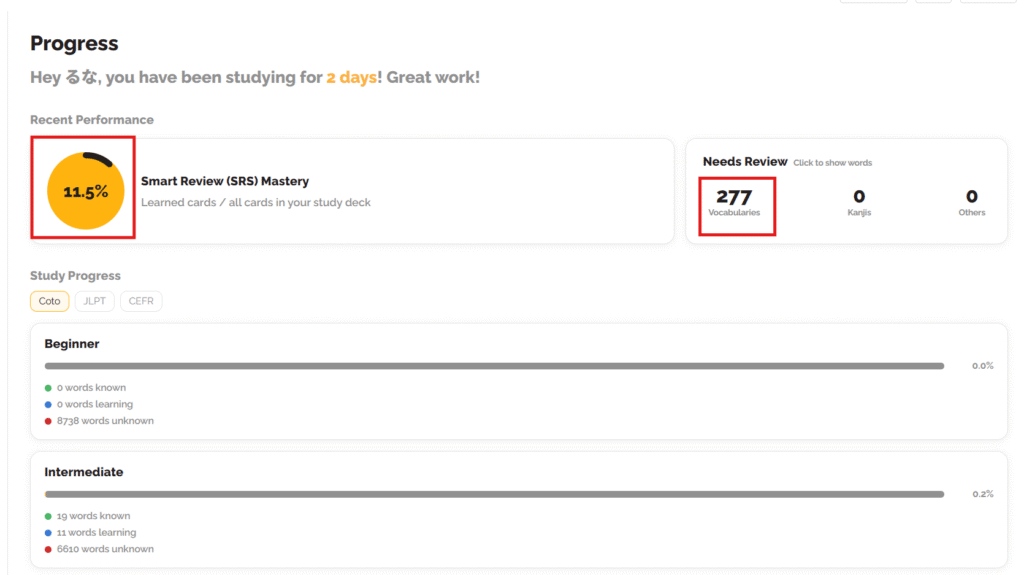
A progress tracking feature is something that a lot of Coto Academy students requested on our survey. Our deck shows a mastery percentage, plus how often you study (days studied and sessions over the last 30 days). The old app had no teacher view at all. Now teachers can follow their students’ progress on the new Students pages. Content can also be locked so only specific groups can access it.
3. Better content
In the Beginner library, we corrected about 4,100 words, merged about 525 duplicate groups into single IDs (so SRS recognizes a word you already mastered in another course), and fixed a romaji bug affecting about 1,700 words.
We added about 5,000 new words, including Kanji Look & Learn, and rebuilt Lite Intensive Kanji B1 to B6. The font now matches our textbooks more closely, so it is easier to read.
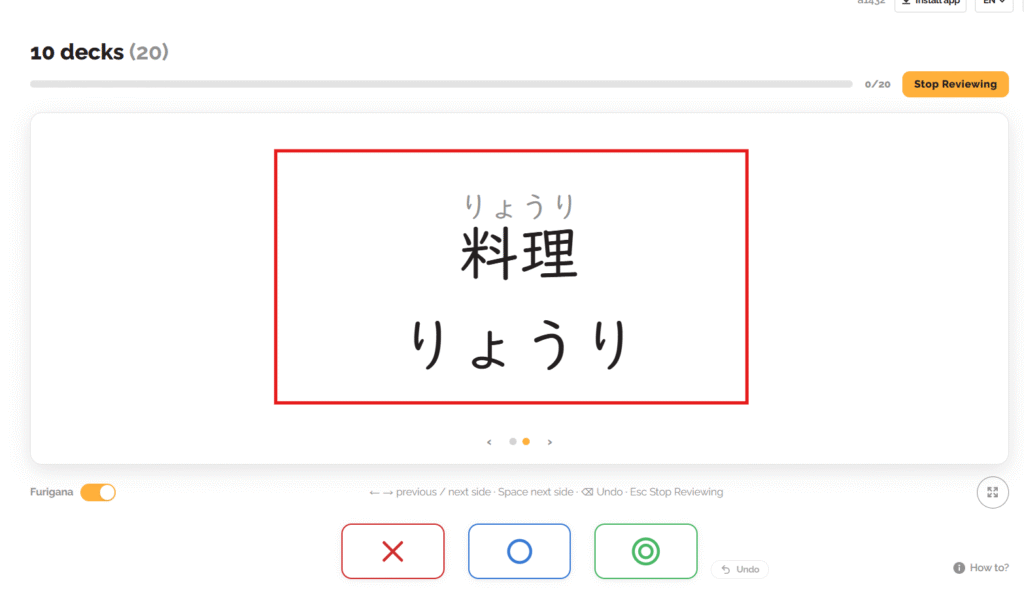
Furigana (small hiragana above kanji) helps you read words you do not know or forget. We also created JLPT decks, and our team can now edit, import, and publish content in-house without going through a vendor.
Getting Started with Coto Cards
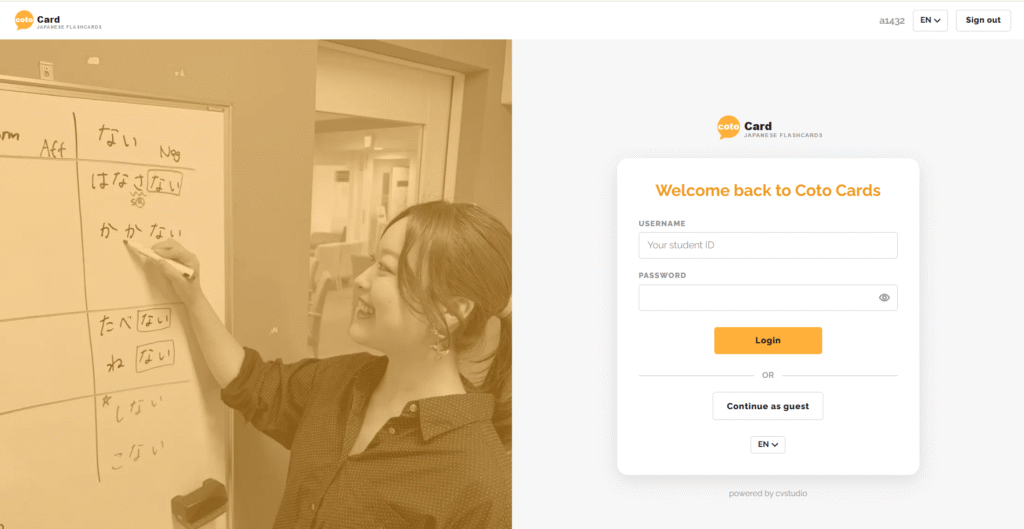
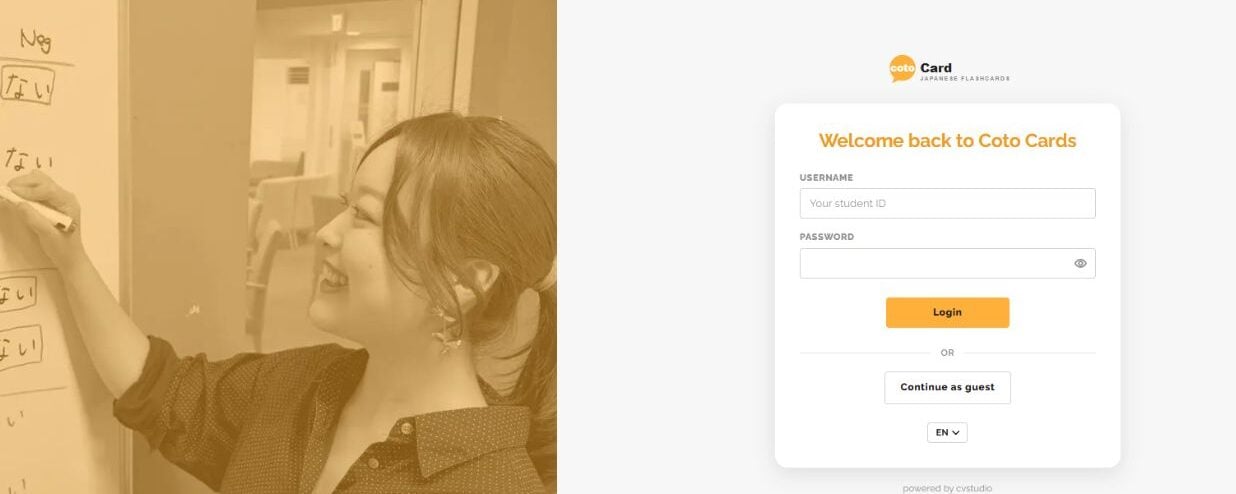
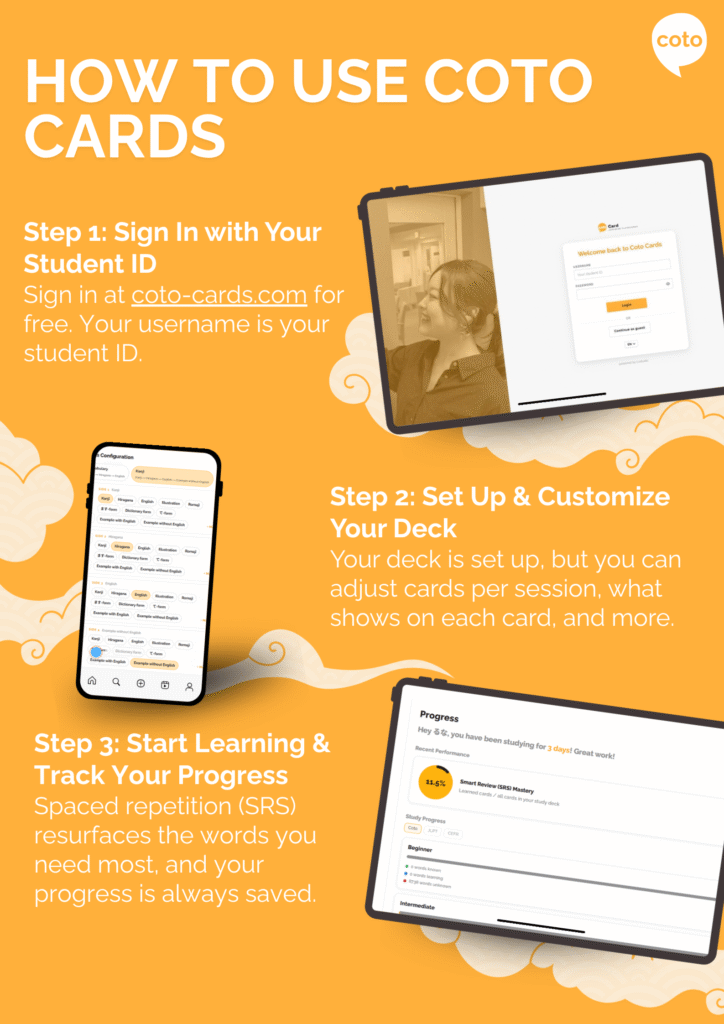
First things first: log in to Coto Cards at coto-cards.com.
- Username: Your username is your past student ID
- Password: Your password will be the email you used to log in to the Coto Academy student portal
Coto Cards is not in the App Store or Google Play right now. It is a mobile-first web app, which means it works in your browser and you can also install it on your phone (as a PWA, or progressive web app).
Once you log in, tap the Install App button to add Coto Cards to your home screen. After that, it opens like any other app, with nothing to download from a store. You can also switch the app language from English to Japanese if you want some extra learning experience. Coto Cards is available to both Coto Academy and Coto Institute students.
Who Can Get Access to Coto Cards?
Current, past, and upcoming Coto Academy and Coto Institute students all get full access to Coto Cards.
- Current Coto Academy and Coto Institute students
- Past students who finished at Coto Academy or Coto Institute up to one year ago
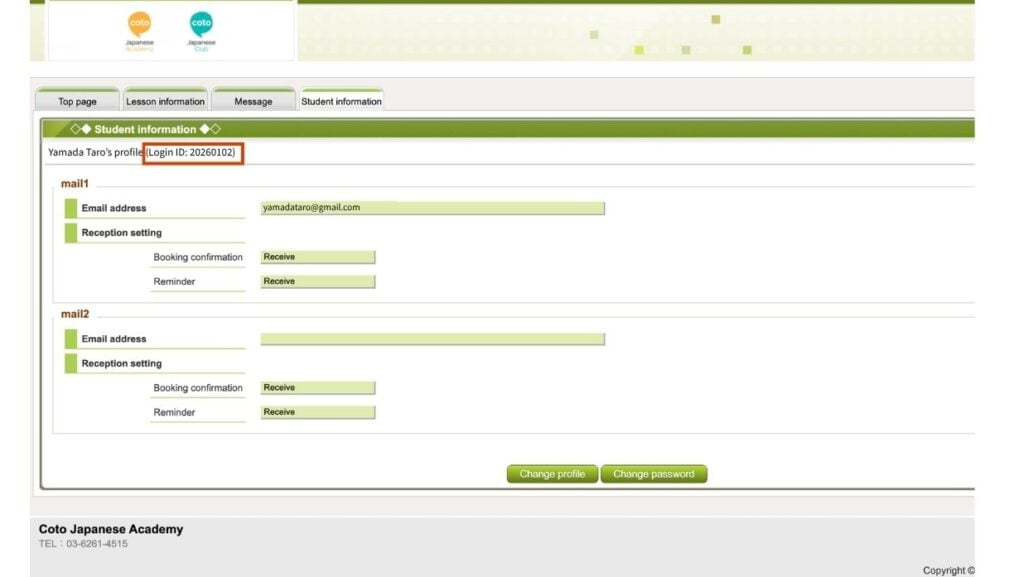
All you need is your student ID and email.
If you do not remember or know your student ID, you can sign in to the Coto Academy student portal. Your student ID is located next to your name (see image below).
Setting Up Your Coto Cards Deck
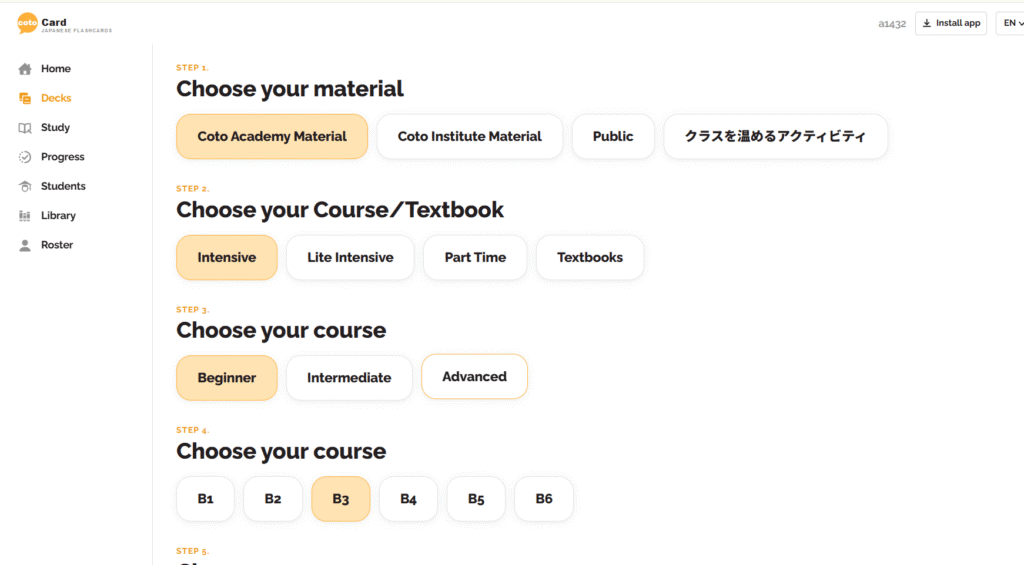
The platform walks you through setup, so you will be ready in under a minute. The new design takes you straight to your class, level, and course.
- Choose your school: Coto Academy or Coto Institute. You can also choose Public to study vocabulary by JLPT level, our Fun and Easy book, or hiragana and katakana.
- Choose your class type: intensive, part-time, lite intensive, or textbook-based.
- Choose the level you are currently attending.
That is it. Your deck is ready, and there is nothing to download or configure!
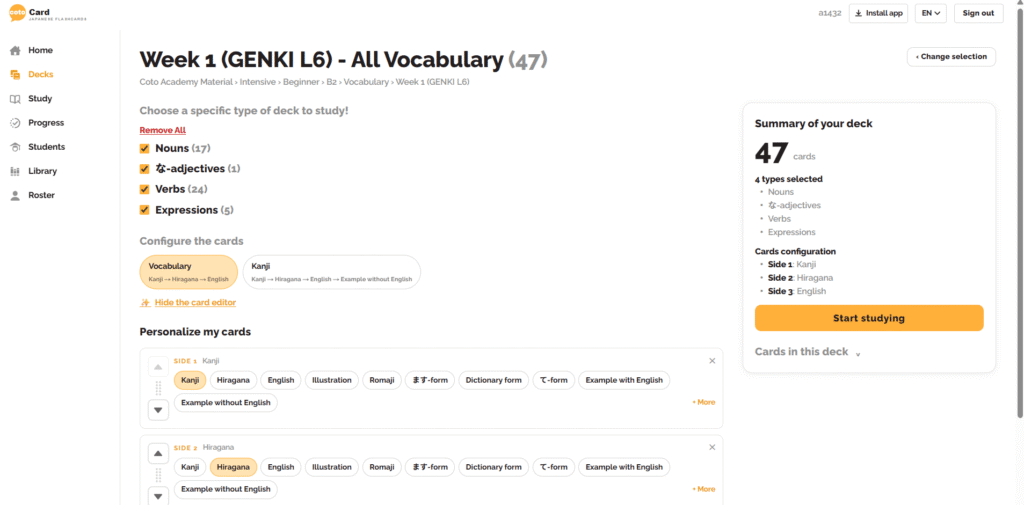
Everything is set up for you, but once you are comfortable, we recommend making it your own. The app is divided into vocabulary and kanji decks.
Vocabulary cards show kanji, hiragana, and the English translation, in that order by default. You can change the order anytime. Kanji cards follow the same order: kanji, hiragana, English. For kanji, you can also turn furigana on or off.
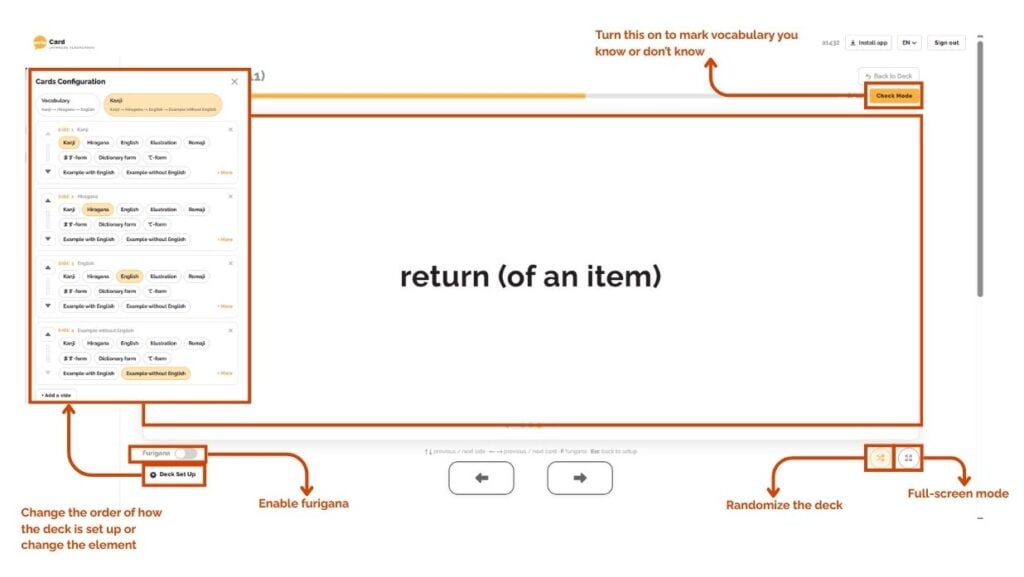
Setting Up Your Coto Cards Study
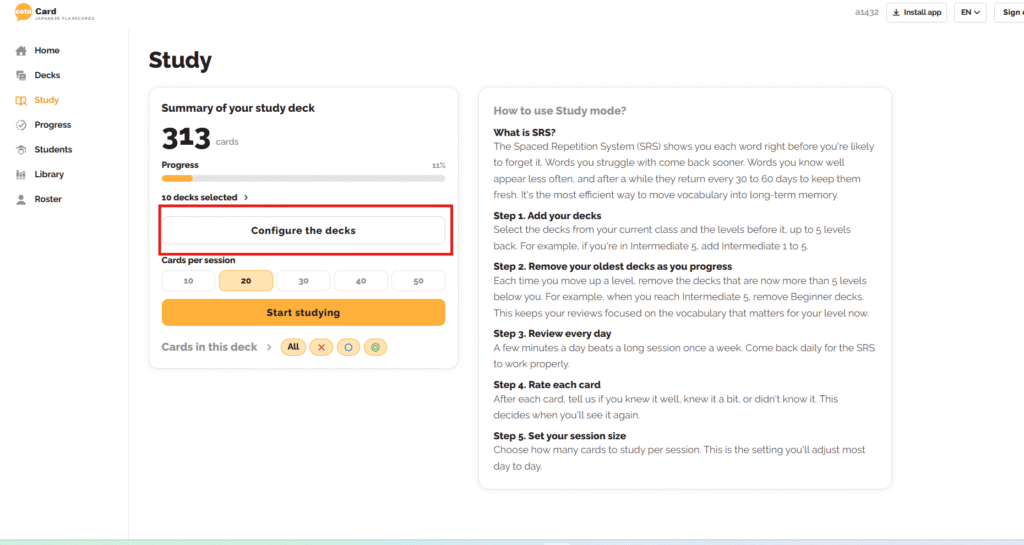
Smart Review on the Study Deck compiles all the flashcards you’ve learned and remembers the cards you got wrong. This wa, Coto Cards is not a one-day app that resets every time you study.
Once your cards look the way you like, it is time to set up how you study. Everyone learns differently: some people like a quick daily check, others prefer longer sessions. Coto Cards lets you do both.
Here, you can set how many cards you want to review per session. You can also choose what to review: all the vocabulary, only the ones you don’t know, cards you know a bit, or cards you know well.
| Step | Action | What to do |
| 1 | Add your decks | Select the decks from your current class and up to 5 levels before it. |
| 2 | Remove your oldest decks | Each time you move up a level, remove decks that are now more than 5 levels below you. |
| 3 | Review every day | A few minutes a day beats one long session a week. Come back daily so SRS can work properly. |
| 4 | Rate each card | Tell us if you knew it well, knew it a bit, or did not know it. This decides when you will see it again. |
| 5 | Set your session size | Choose how many cards to study per session. This is the setting you will adjust most. |
What is The Difference Between Coto Cards Study and Deck?
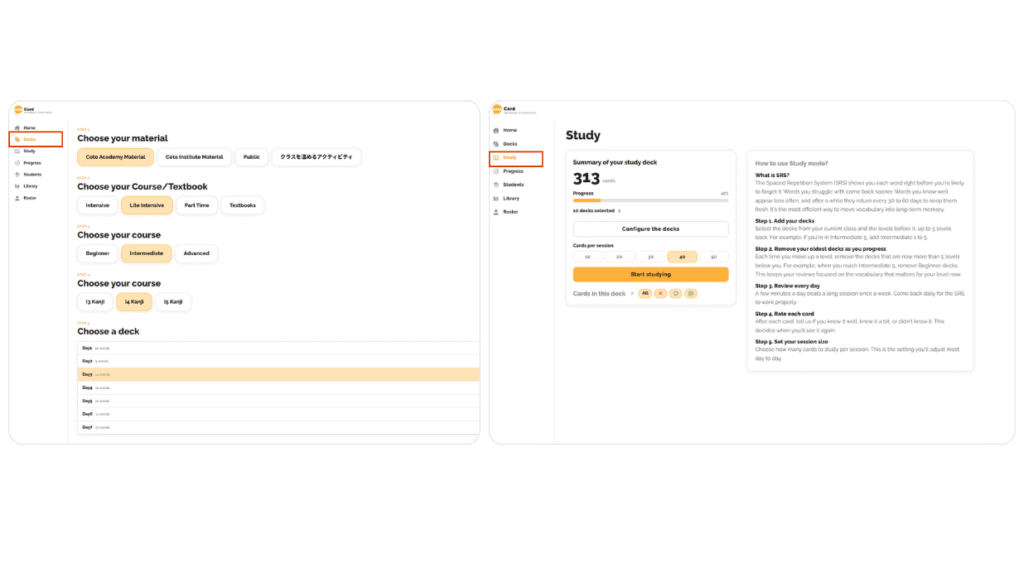
You’ll notice two settings in your dashboard: Deck and Study. Deck is a quick, one-time flashcard set. It pulls the vocab and kanji from a single lesson, so it’s perfect for a fast review before class. It doesn’t save your past flashcards or use the SRS system, so each deck is a fresh start and gre
Study works more like Anki. It uses spaced repetition (SRS) to bring back the words and kanji you need to see again, and it keeps track of what you’ve learned over time.
| Difference | Deck | Study |
|---|---|---|
| Type | One-time use | Ongoing, like Anki |
| Content | Vocab and kanji from one lesson | Combines all the flashcards you’ve learned |
| Customization | Less customizable | More customizable, with filters |
| Progress | Doesn’t save what you skipped or remembered | Saves your progress |
| SRS | No | Yes |
| Great for | Quick review between Japanese lessons | Long-term retention |
What Is SRS?
One feature you will not see but will definitely feel is the Spaced Repetition System (SRS). SRS is a proven method that shows you each word right before you are likely to forget it. Words you struggle with come back sooner. Words you know well appear less often, and after a while they return every 30 to 60 days to keep them fresh. It is the most efficient way to move vocabulary into long-term memory.
| Button | Symbol | What it shows |
|---|---|---|
| All | All | Every card in your selected decks |
| Red cross | ✕ | Cards you did not know |
| Blue circle | ○ | Cards you knew a bit |
| Green double circle | ◎ | Cards you knew well |
What’s Going to Happen to the Old Coto Cards?
If you’re using the old Coto Cards app from the App Store, that’s great. Keep using it! We plan to migrate it to the new Coto Cards in the future, but for now, enjoy it to the fullest. We’ll let you know when it’s time.
Tips for Using Coto Cards
Coto Cards gives you the tools to study your way, right on your phone or computer. Here are some tips for making the most of it.
- Find what works for you. Coto Cards is easy to customize. Turn furigana on when you are learning new kanji, then turn it off when you want to test yourself. Change the order of the card (kanji, hiragana, English), choose how many cards you study per session, and filter by the cards you knew well, knew a bit, or did not know.
- Take advantage of all the features. You get access to every level, so use that. Go back to the levels below yours for a quick refresher, or look ahead and preview the vocabulary and kanji for your next class. You walk in already familiar with the words.
- Optional third tip: Review a little every day. A few minutes a day beats one long session a week. Smart Review remembers what you got wrong and brings those cards back at the right time, so short, daily sessions work best.
Learn Japanese at Coto Academy and Get Coto Cards Free
Thinking about learning Japanese? Love flashcard apps? This is your sign to join Coto Academy. When you enroll, you automatically get free access to Coto Cards, including every level right away. No extra purchase, no download, no setup. Contact us today for a free level check!