



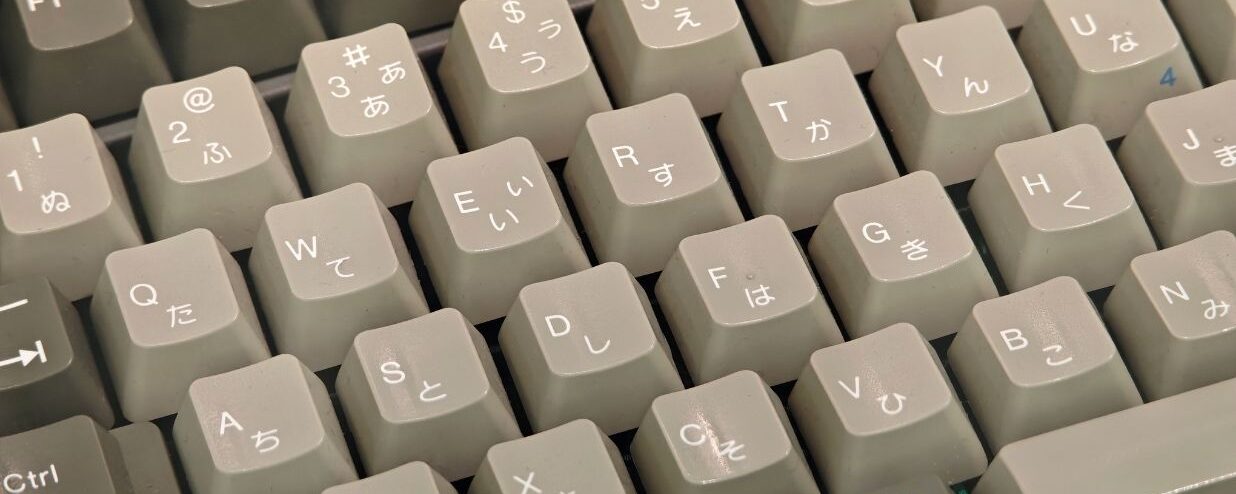


If you’ve ever typed your name in katakana into an online form and gotten an error like “must be entered in full-width characters,” don’t panic, it’s not a system error. Japanese websites actually require you to type using full-width katakana (全角, zenkaku) because their backend databases and legacy verification systems are built on fixed-width character grids that expect square, double-byte characters.
But what exactly are full-width and half-width characters, how are they different, and how do you convert between them? Half-width characters, known in Japanese as 半角 (hankaku), take up half the horizontal space of their full-width counterpart, 全角 (zenkaku). Let’s break down the differences, why they exist, and how to type each one.
What are Half-Width (半角) and Full-Width (全角) Characters in Japanese?
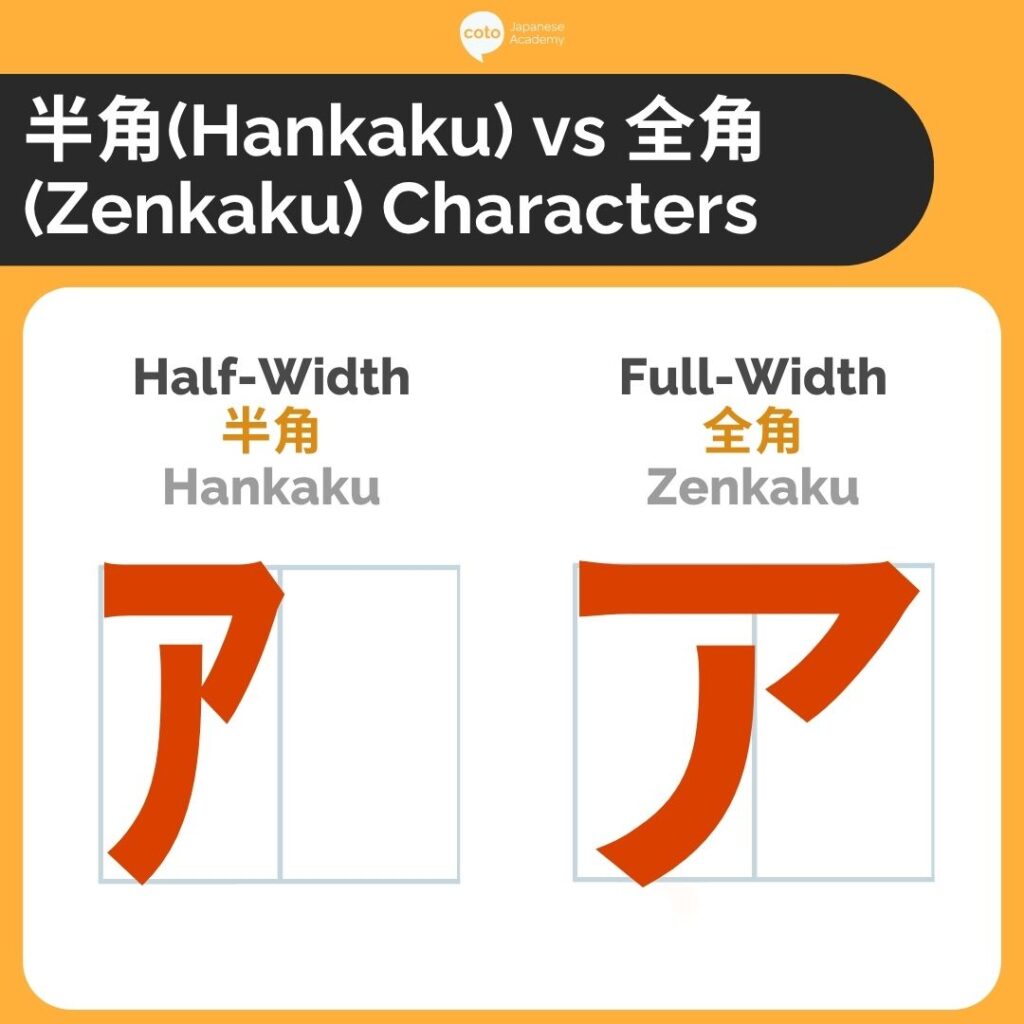
Half-width, known in Japanese as 半角 (hankaku), are characters, numbers, or symbols that only take up half the horizontal space of a 全角 (zenkaku), or full-width character. Both hankaku and zenkaku are input types used when typing on a Japanese, Chinese, or Korean keyboard. Unlike English and other Western letters that use narrower, standardized characters by default, Japanese, Chinese, and Korean are fitted to wider square grids.
You can easily tell them apart visually: half-width characters are narrower, true to their name. Let’s look at an example:
- タナカ(half-width)
- タナカ (full-width)
So, hankaku characters are only half a grid, while full-width characters take up the whole square grid. In more technical computer terms, a hankaku character takes up 1 byte of data, and a zenkaku character takes up 2 bytes.
Why Does Japan Use Half- or Full-Width Characters?
The reason Japan uses half- and full-width characters goes back to when they first created their electronic character system. The first alphanumeric coding system was created by an American IBM engineer, Bob Bemer, who wanted a standardized system that would allow computers from different manufacturers to communicate with each other.
So, in 1969, Japan followed suit and created its own standardized electronic coding system with Japanese characters, called the JIS 6220. Initially, the only Japanese characters you could type were half-width katakana characters, which didn’t take much data and were sufficient for the communication needs at that time. Back then, you would only need to write short telegrams, and other processes were much simpler.
Then, in 1991, a unicode language character set was created to allow computers to handle different characters and output them correctly. With this, computers can accurately handle all the Japanese character systems, including hiragana, katakana, and kanji.
So, today both half-width and full-width are used as Japanese character inputs since there are a variety of coding schemes, rather than a single uniform one. Often when you fill out forms, half-width characters might be used for Western letters, numbers, and emails, but Japanese characters often use full-width for easier readability, especially for kanji characters.
When Do You Use Half- & Full-Width?
| Character Type | Full-Width (全角) | Half-Width (半角) | Common Use Case |
|---|---|---|---|
| Katakana | コーヒー | コーヒー | Full-width is standard in modern writing; half-width shows up mostly in old receipts, POS systems, and legacy software |
| Hiragana | あいうえお | (no standard half-width form) | Hiragana is always written full-width |
| Romaji / Latin letters | ABC abc | ABC abc | Half-width is standard for English text mixed into Japanese sentences; full-width romaji sometimes appears for stylistic emphasis or in old forms |
| Numbers | 123 | 123 | Half-width is standard for phone numbers, prices, and dates; full-width numbers appear in vertical text or decorative headings |
| Symbols/Punctuation | ()、。!? | (),.!? | Full-width punctuation matches Japanese text spacing; half-width is used within English words or code |
| Spaces | (full-width space) | (half-width space) | Full-width spaces are sometimes used for visual alignment in Japanese text; half-width is standard elsewhere |
Across Japanese platforms and devices, you may use either half- or full-width depending on what you need to input. In general, here are the most common use cases for each.
When to Use Half-Width Japanese Characters
Most Japanese forms will use half-width characters for alphanumeric character inputs, which often include numerical values or Western letters such as emails, passwords, and phone numbers. However, certain forms like receipts or bank forms may prefer half-width since they take up much less space, especially since loanwords written in katakana tend to take up more space. Initially, when data storage space was more limited, half-width was more common since it only took up half the space as full-width.
When to Use Full-Width Japanese Characters
Full-width is usually the default whenever you need to type using Japanese characters. Hiragana, katakana, and kanji are all usually written in full-width. So, whenever you’re writing your home address, your name, emails, or even just a Word document in Japanese, you are probably using full-width characters.
Also note that certain document formats may have trouble reading Japanese full-width characters, so these are also cases when you might need to switch to half-width.
Setting Up Full-Width and Half-Width Japanese Characters on Your Keyboard
If you type in Japanese regularly, switching your input method is faster and more reliable than converting text after the fact. The first thing you need to do is install Japanese as an input source. The steps differ depending on whether you’re using Mac or Windows.
On Windows
- Go to Settings > Time & Language > Language & Region.
- Add Japanese as a language and install the Microsoft IME.
- Switch input languages with Windows key + Space, or click the language bar in your taskbar.
- Once Japanese IME is active, use the half-width/full-width key (半角/全角, usually top-left of the keyboard) to toggle input mode. You can also right-click the IME icon to set direct input (half-width) or hiragana input (full-width) as default.
On Mac
- Go to System Settings > Keyboard > Input Sources.
- Click the + button, select Japanese, and add both Romaji and Kana input methods.
- Switch between languages with Control + Space, or click the input menu in the menu bar.
- Toggle between full-width and half-width using the input mode dropdown next to the flag icon, or the Caps Lock/Eisu key depending on your keyboard.
Full-Width and Half-Width Online Converter
If you haven’t set up your keyboard for Japanese input and just want a quick fix, a few websites can convert full-width to half-width, and vice versa. Let’s take a look below.
How to Use Half-Width Characters
Whenever you use a Japanese keyboard, by default, the characters you type are full-width unless you choose otherwise. Many Japanese keyboards allow you to directly choose between the Japanese input types:
- ひらがな (hiragana): Hiragana character keyboard that only comes in full-width
- 全角カタカナ (zenkaku katakana): Full-width katakana keyboard
- 全角英数字 (zenkaku eisuuji): Full-width alphanumeric characters (English letters and numbers)
- 半角カタカナ (hankaku katakana): Half-width katakana keyboard
- 半角英数字 (hankaku eisuuji): Half-width alphanumeric characters (English letters and numbers)
Choosing between half- and full-width characters might depend on the operating system, device, or electronic keyboard you are using. Some Windows computers require you to choose between half-width and full-width keyboards to use either one. On MacBooks, depending on the word you type with a standard hiragana keyboard, you can choose half- and full-width katakana versions of the word by pressing “space” and choosing from a list of different character input options.
Problems Facing Half- and Full-Width Characters
As mentioned, there isn’t a uniform character input system, which can cause complications with different document formats, especially when converting between different formats. Also, the use of half- or full-width characters can sometimes lead to issues on forms, which could slow down certain processes.
Generally, visitors and international residents need to write their names in カタカナ (katakana) or English, which, if written in the wrong format, could lead to errors. So, the differing formats can sometimes overcomplicate filling out input fields and prevent users from actually filling in the correct information.
But things are definitely improving! Japanese computer systems are updating and making things more streamlined. Generally, input fields inform users when an incompatible format is being used. Overall, whenever you need to write something in Japanese, you can usually default to full-width.
Final Remarks on Half- and Full-Width Characters in Japanese
The half- and full-width character inputs are a result of the mapping of Japan’s unique system onto a standardized character coding system that is readable on every computer. But since most modern keyboards can handle full-width and just default to it, there’s no need to worry too much about when to use half- or full-width characters. Most Japanese forms will also default to the input type they need, so all you have to do is learn how to write in Japanese!
Learn How to Write in Japanese with Coto Academy!
In order to type the correct full-width or half-width characters, you will need to learn how to write in Japanese, and Coto Academy is the perfect place to do just that! Our courses focus on practical Japanese skills you need to fill out forms necessary for daily life, write emails, and, of course, speak natural Japanese.
From conversation and business to comprehensive programs focusing on every skill, we can tailor our classes to your Japanese learning goals! Drop by one of our campuses across Tokyo and Yokohama, or join us online from anywhere around the world! If you want to sign up or just have a quick chat, just fill out the form below and we will get in touch as soon as possible!
FAQ:
What's the difference between hankaku and zenkaku?
Hankaku (半角) is half-width and takes up half a character grid, while zenkaku (全角) is full-width and takes up a whole grid. In data terms, hankaku is 1 byte and zenkaku is 2 bytes.
Can hiragana be written in half-width?
No, hiragana only exists in full-width; there’s no half-width version.
Should I use half-width or full-width for my name and address?
Full-width. Japanese characters like kanji, hiragana, and katakana are almost always written in full-width for readability.
When should I use half-width characters?
You usually use half-width characters for Western letters, numbers, emails, and phone numbers, since they don’t take as much space as Japanese characters. You might also need to use half-width characters whenever space is limited.
How do I switch between half-width and full-width when typing?
It depends on your device. Many Japanese keyboards let you toggle directly (e.g., 半角カタカナ vs. 全角カタカナ), while on Mac you can often press “space” after typing a word to pick from different width options.
Does it matter if I use the wrong width on a form
Yes, some forms will reject or flag the wrong format, especially for names in katakana or English. Most modern systems now warn you if the format doesn’t match what’s expected.